






Unleash the full potential of TI with a wide range of Lookup parameters.
In today's fast-evolving cyber landscape, effective threat intelligence is crucial for staying ahead of cybercriminals.
Threat intelligence portals like Threat Intelligence (TI) Lookup are a primary source of such data. Analysts can use it to enrich and streamline their investigations.
The standout feature of TI Lookup is its integration with a cloud malware sandbox. This lets security professionals easily study the execution flow of any threat they find across TI Lookup's database in a safe dynamic environment to gain deeper insights into ongoing threats.
Here are 30 types of data that you can use in TI Lookup when collecting, filtering, and analyzing threat intelligence.
Request a 14-day free trial of Threat Intelligence Lookup to try its advanced threat intelligence search capabilities
Task
These parameters help you dive into the characteristics of sandbox sessions, allowing for specific queries based on threat levels and submission details.
threatName: Search by malware family or threat type (e.g., "ransomware," "phishing").
submissionCountry: Filter threats based on the country of submission (e.g., "us," "de").
threatLevel: Query the verdict on the sample's threat level (e.g., "malicious," "suspicious").
taskType: Specify the type of submission-whether it's a file, URL, or other types of samples.
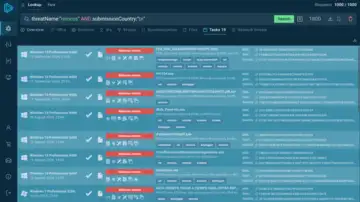 Search that includes the threat name "Remcos" and the country "Brazil" yields many relevant sandbox sessions
Here is an example of a query for finding samples of the Remcos malware uploaded to the sandbox for analysis by the users from Brazil.
Registry
These reveal how threats interact with the Windows registry, providing a deeper understanding of system modifications.
registryKey: The specific registry hive where a modification occurred (e.g., "Windows\\CurrentVersion\\RunOnce").
registryName: The name of the Windows registry key field (e.g., "isshortcut").
registryValue: The actual value of the registry key, useful for spotting malicious changes (e.g., "internet explorer\iexplore.exe").
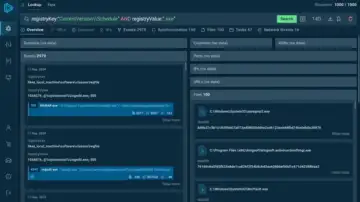 You get events, sync details, and network threats tied to the query.
 Using the above query, we can find threats that attempt to execute harmful code through scheduled tasks.
Environment
These parameters describe the operating environment in which a threat was detected, giving insights into system characteristics.
os: The operating system version in which the threat was executed (e.g., "Windows 10").
osSoftwareSet: The set of applications installed in the environment (e.g., "complete," "office").
osBitVersion: Check whether the OS is 32-bit or 64-bit, crucial for malware targeting specific architectures.
Detection
Detection parameters focus on the rules and techniques used to identify malware in sandbox sessions.
ruleName: The specific detection rule triggered by the threat (e.g., "Executable content was dropped").
ruleThreatLevel: The threat level assigned by the detection rule (e.g., "info," "malicious").
MITRE: The technique used by the malware, classified under MITRE ATT&CK (e.g., "T1071").
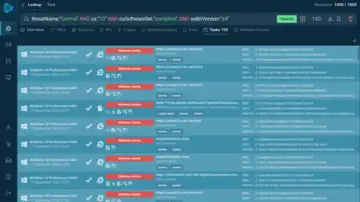 You can explore all of the sandbox analysis sessions provided by TI Lookup
Above, you can see an example of a query that lets you find sandbox sessions featuring the Lumma stealer analyzed in Windows 11 x64.
Module
Modules refer to the individual components loaded by the malware, such as DLLs and libraries.
moduleImagePath: The full path to the module's executable file (e.g., "SysWOW64\cryptbase.dll").
moduleLoaded: Search for modules loaded into memory during a threat's execution (e.g., "KernelBase.dll").
Connection
These parameters provide insights into the network-related behavior of threats, from IP addresses to domain names.
domainName: Identify the domain names involved in threat execution (e.g., "tventyvd20sb[.]top").
destinationIP: Search by the IP address the threat attempted to connect to (e.g., "162[.]125[.]66[.]15").
destinationPort: The port used during the network connection (e.g., "49760").
destinationIpAsn: The ASN associated with the IP (e.g., "akamai-as").
destinationIPgeo: Geolocation of the IP involved in the threat (e.g., "de" for Germany).
ja3/ja3s/jarm: TLS fingerprints that can help identify certain threats based on encryption patterns.
Process
Process-related parameters focus on actions taken by malware during execution, such as file access or command-line arguments.
imagePath: The path to the executable file being run (e.g., "System32\conhost.exe").
commandLine: Full command line used by the process (e.g., "cmd.exe /c").
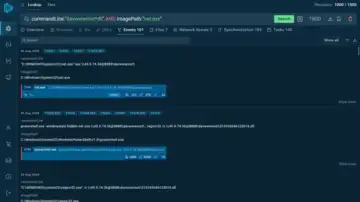 The events tab lists the exact processes recorded during active sandbox sessions that fit the query
Using the parameters shown in the image above, we can locate Strela stealer samples that use net.exe to connect to a C2 server with a 'davwwwroot' folder.
Network Threats
Network-based threats detected by the Suricata IDS, which can help detect intrusion attempts
suricataMessage: Suricata's description of the threat (e.g., "ET MALWARE Redline Stealer TCP CnC Activity").
suricataClass: Suricata's classification of the threat type (e.g., "network trojan").
suricataThreatLevel: Suricata's verdict on the threat (e.g., "malicious").
File
These parameters relate to files within the system, including hash values and file types.
filePath: The specific file path involved in the session (e.g., "Users\admin\Desktop\README.TXT").
fileExtension: The extension of the file under analysis (e.g., "exe," "dll").
sha256/sha1/md5: Hash values of files, enabling tracking of specific malware families.
Synchronization
These parameters describe activities like mutexes or events that are created by malware for synchronization purposes.
syncObjectName: The name of a synchronization object used by the malware (e.g., "rmc," "m0yv").
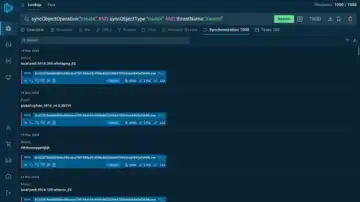 The service offers an extensive list of objects found in sessions analyzing the Xworm malware
Combining operation and type parameters with threatName allows searching for specific mutexes or events created during the execution of a particular malware.
Discover More Ways to Collect Threat Intelligence with TI Lookup
You can discover a detailed breakdown of over 40 different search parameters and see relevant examples in the official guide to TI Lookup.
Conclusion
With the wide range of parameters offered by ANY.RUN's TI Lookup, security professionals can significantly enhance their threat intelligence operations. From tracking the latest malware strains to uncovering hidden network connections, these tools offer invaluable insights into cyber threats, empowering organizations to make informed decisions and strengthen their defenses.