




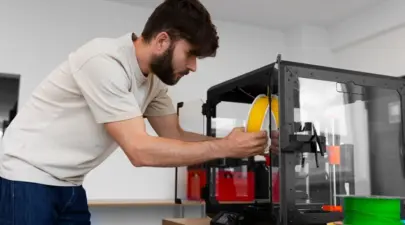

3D printers are often slow due to the detailed layer-by-layer construction process they use to create objects. This method, known as additive manufacturing, requires precise material placement, which takes time.
What do 3D printer speeds mean?
3D printer speeds, reported by manufacturers, indicate how quickly a machine can build an object from raw material. This speed reflects the time required to process the digital file, deposit the additive, and cure or fuse the material into a finished product. It does not include post-production curing or finishing times.
Manufacturers typically express 3D printing speeds in millimeters per hour. While this provides a rough idea of a machine's capability, it's not a foolproof metric for comparing different printer types due to inherent differences among them.
For instance, some 3D printers can quickly produce rough objects but slow down significantly when creating items with fine details. Others slow down as the size of the item increases due to the build volume and operational method.
An industrial fused deposition modeling (FDM) printer using filament additives typically builds at 100 mm per hour but can be adjusted to 500 mm per hour. In contrast, an industrial stereolithography (SLA) printer using liquid resin may achieve speeds of 700 mm per hour, compared to 40-70 mm per hour for consumer 3D printers.
Generally, industrial or large-scale 3D printers offer higher production volumes, faster printing speeds, and larger build sizes than home or desktop-sized printers.
What Factors Affect 3D Printer Speed?
A 3D printer's speed is affected by many factors, including its construction method and the power and quality of its components, such as the light source or gears. The materials used to create an object also impact production speed, as some materials take longer to cure or require additional finishing steps.
The design of the item plays a crucial role in determining printing speed. For example:
Larger items take longer to print than smaller ones with the same level of detail.
Whether an object is solid or hollow, and the thickness of its walls or parts, will also affect printing time.
Items with intricate details and requiring precision finishing take longer to print than simpler pieces. Sometimes, the quality of the print can be affected by the speed; for example, if the material begins to cure before the nozzle moves away, it might cause imperfections.
The printer's accuracy or quality settings influence the production time. Thinner layers result in higher-quality and stronger objects but require more passes, increasing the total print time.
These inherent features of a 3D printer, along with the specifics of the project design and material used, collectively determine how quickly a 3D printer can complete a given task.
The Best Fast 3D Printers:
1. AnkerMake M5 3D Printer:
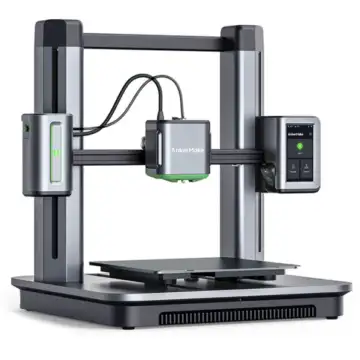 Image Source: tanotis.com
The AnkerMake M5 3D Printer is tailored for users who prioritize high-quality prints and efficiency, particularly in rapid prototyping scenarios. Here's how it stands out:
Speed Enhancement: The M5 drastically reduces printing time by up to 80%, leveraging PowerBoostTM 2.0 for smoother power delivery and a 30% increase in power release over its predecessor. This enhancement increases printing speed and acceleration with the same print quality.
Intelligent Printing Management: Equipped with advanced features like an integrated intelligent camera and powerful processing capabilities, the M5 calculates and adheres to precise printing plans, ensuring your models match your design specifications flawlessly.
Remote Accessibility: Users can initiate and monitor prints from anywhere using the AnkerMake App, Slicer, or Amazon Alexa, making it convenient for both laboratory settings and remote operations.
User-Friendly Interface: The AnkerMake Studio and App simplify operation for all experience levels, offering intuitive slicing tools and parameter adjustments.
Speed and Volume: Capable of achieving speeds up to 500 mm/s, the M5 features a print volume of 235×235×250 mm³, facilitated by a sturdy aluminum alloy structure and easy assembly with 7×7 auto-leveling.
Additional Features: Built-in AI camera monitoring ensures print progress is monitored effectively, while auto-created time-lapses and hub connectivity for multiple devices enhance usability and workflow efficiency.
The AnkerMake M5 sets a new standard in 3D printing by combining speed, precision, and user-centric features, making it an ideal choice for professionals and enthusiasts alike who prioritize both quality and efficiency in their projects.
Purchase link: tanotis.com
2. Creality High-Speed K1 3D Printer
 ImageSource: robu.in
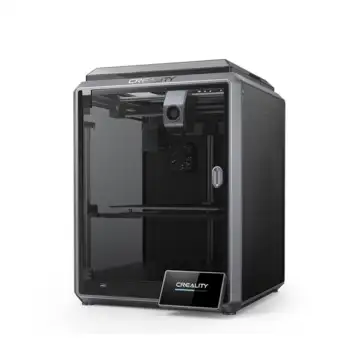
Experience the future of 3D printing with the Creality High-Speed K1 3D Printer, which sets new standards in rapid prototyping and creative production with its impressive features:
Blazing Speed: Achieve speeds up to 600 mm/s, ensuring quicker results without compromising quality.
Hands-free Auto Leveling: Maintain impeccable precision effortlessly, eliminating the need for tedious manual adjustments.
Precision Engineering: Crafted with top-tier components, guaranteeing high accuracy and intricate detailing in large-scale https://robu.in/Delta and
Spacious Build Area: Enjoy the freedom to materialize large-scalhttps://robu.in/Delta elevate your creativity with speed and unwavering quality.
Purchase link: robu.in
3. Delta FDM 3D Printer:
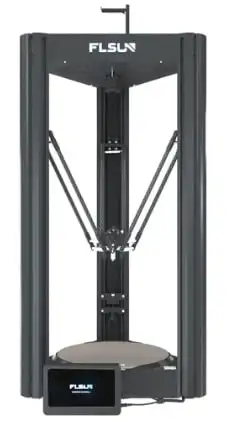 Image Source: amazon
The Delta FDM 3D printers from 3idea are built with speed and efficiency at the forefront from the ground up.
Here's how they achieve this:
Light Print Head: The Delta printers feature a lightweight print head that offers enhanced speed and control by minimizing momentum. This design choice enables quicker movements during printing, contributing to faster overall print times.
Simplified Design: Compared to traditional bed-slinger printers, Delta printers utilize fewer components. This simplified structure not only boosts operational efficiency but also lowers manufacturing costs. By minimizing complexity, Delta printers offer a more economical solution without compromising performance.
Impressive Build Volume: The Delta V400 boasts an impressive build size of 300 x 410 mm, allowing for the creation of large, high-quality prints. This expansive build volume accommodates diverse printing needs, from prototypes to functional parts, in superior detail and scale.
Ultra-Fast Printing: With a remarkable print speed of up to 400 mm/s, the Delta V400 significantly reduces print durations. This capability translates to up to 70% faster printing times compared to conventional printers, enhancing productivity and turnaround for projects.
Pre-installed Klipper Firmware: The Delta V400 comes pre-configured with Klipper firmware. Klipper's advanced features facilitate easy operation, including WiFi connectivity for remote accessibility and control.
User-Friendly Interface: Featuring a 7-inch LCD touchscreen powered by KlipperScreen, the Delta V400 offers intuitive navigation and operation. This user-friendly interface enhances usability, making it straightforward to manage and monitor print jobs effectively.
High-Quality Construction: Dual linear rails with grooved linear guides ensure exceptional stability during printing. This robust framework enhances the precision and smoothness of printed lines, resulting in superior print quality noticeable in every detail and layer.
What Happens When You Print Fast?
Printing too fast on a 3D printer can lead to more than just overheated stepper motors; it significantly impacts print quality and long-term reliability. When pushing the speed limits, the printer's components, particularly on Prusa i3-style machines, can suffer from vibrations that cause issues like ringing or ghosting in prints. These vibrations stem from the strain of rapid movements, which affect the precision of layer deposition.
Moreover, continuous high-speed printing can loosen components over time, requiring frequent tightening of screws and potentially causing irreversible damage to motion components. This is especially true for inexpensive V-slot rollers commonly used in such printer designs. These rollers, which guide the print bed along aluminum tracks, wear out quickly under the stress of fast printing speeds, compromising the printer's stability and accuracy.
While the Prusa i3-style printers struggle with quality at higher speeds, alternative printer designs offer more promising options. Different designs, such as CoreXY or Delta printers, are engineered to handle faster print speeds more effectively. These designs often feature mechanisms that minimize vibrations and distribute movement more evenly, enhancing both print quality and the printer's longevity.
SelfCAD: Best 3D Printing Software for all
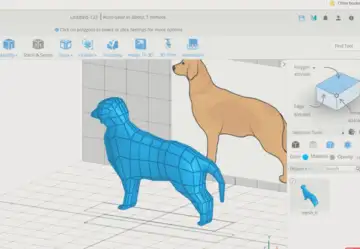 Image Source: selfcad.com
SelfCAD stands out as the top 3D modeling and printing software for 2024, catering to both seasoned professionals and newcomers alike. It integrates a slicer directly into its interface, eliminating the need for additional software and accommodating a wide array of FDM 3D printers. What distinguishes SelfCAD is its comprehensive approach, which combines technical precision, artistic creativity, and efficient 3D printing preparation on a user-friendly platform. SelfCAD provides powerful tools for rendering, freehand drawing, and sketching, which makes it ideal for drawing intricate sculptures or drafting architectural blueprints.
Navigating SelfCAD is intuitive with its well-organized layout and tool categorization, making it accessible for beginners. Professionals benefit from advanced features such as sculpting tools for organic shapes, animation capabilities, rendering options, and precise architectural detailing tools. SelfCAD's flexible pricing includes annual, monthly, and perpetual license options, priced at $149.99, $14.99, and $500, respectively, ensuring accessibility and power for diverse projects and skill levels.
Conclusion:
In conclusion, the slow speed of 3D printers stems from their meticulous layer-by-layer construction process, influenced by factors like print resolution, design complexity, material type, and cooling requirements. Despite these limitations, ongoing technological advancements continue to enhance print speeds, promising future improvements in additive manufacturing efficiency.