





Last week, a disturbing trend started on the Elon Musk-owned X platform. People were misusing the GrokAI bot to edit women's photos illegally without their consent.
This led to widespread condemnation on the platform, and taking note of the severity of the issue, the government of India also sent an official note to the company to take down those pictures from its platform immediately or risk facing sanctions. While the platform has begun deleting vulgar pictures, people outside India continue to misuse the platform.
And, people have been warned not to post their pictures until the X platform takes a firm decision on censoring the GrokAI bot.
GrokAI faces flak over gross misuse of Gen AI to edit pictures of women on X platformIt should be noted that in July 2024, the X platform enabled a setting by default for all its users' public statements, interactions and multimedia content to be used to train the Grok AI model.
Now, those who forgot to disable it are facing the consequences. It's not too late, though, as users can opt out of it by changing the settings by following the procedure shown below:
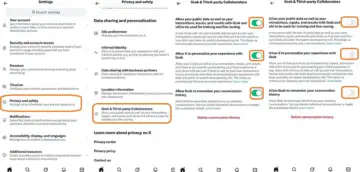
Steps on to how to disable X platform using your data to train Grok AI.
Step 1: Go to Settings >> Privacy and safety
Step 2: Scroll down and tap 'Grok & Third-party Collaborators'
Step 3: Then, Disable all three options:
a) Allow your public data, as well as your interactions, inputs, and results with Grok and xAI, to be used for training and fine-tuning.
b) Allow X to personalise your experience with Grok
c) Allow Grok to remember your conversation history
Once you disable all three aforementioned options, strangers on the X platform will not be able to use GrokAI to illegally edit your photos or content.
Also, for more protection, users can make their posts private.
Here's how to do it:
On Mobile (iOS & Android App):
Step 1: Tap your profile icon (top left).
Step 2: Tap Settings and Support, then Settings and privacy.
Step 3: Tap Privacy and safety.
Step 4: Tap Audience and tagging.
Step 5: Toggle the slider next to Protect your posts to turn it on
Grok user making illegal content will suffer same consequence as uploading such content: Musk