




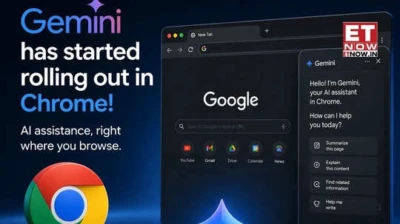

Most people use Chrome the same way they have for years open a tab, type something, click a link and repeat. Google thinks that routine is overdue for a rethink, and it's now betting on Gemini to change it.
Starting today, a significant set of Gemini-powered features inside Chrome are rolling out to desktop and iOS users across seven Asia-Pacific markets: Australia, Indonesia, Japan, the Philippines, Singapore, South Korea, and Vietnam.
The timing is deliberate. Asia-Pacific is home to some of the world's most active internet users, and Google has been watching the region's appetite for AI-powered tools grow considerably over the past year. Bringing Gemini into the browser the place where most of that internet activity actually happens is Google's way of making AI useful where people already are, rather than asking them to go somewhere new to find it.
What do Gemini in chrome actually do
So what does Gemini in Chrome actually do? At its most basic, it works as a browsing assistant that lives in a side panel. You can ask it to summarize a long article without reading the whole thing, compare information spread across multiple open tabs, or ask questions about a YouTube video while it's playing all without navigating away from the page you're already on. For anyone who regularly juggles research across a dozen open tabs, that last part alone is worth paying attention to.
The deeper integration with Google's own apps is where things get genuinely interesting. Through Gemini in Chrome, users can now interact with Google Calendar, Maps, and Gmail directly from their browser without switching apps or opening new windows. Need to schedule a meeting while reading an email thread? Done from the same tab. Want to check location details for a restaurant you just read about? Maps information surfaces without leaving the page. Draft and send a Gmail reply while browsing? That too.
A new capability called Nano Banana 2 adds image transformation to the mix users can describe what they want to do to an image on a webpage using a simple text prompt, and Gemini handles the edit from within the Chrome side panel. It's an early glimpse at how browsers might handle visual content in the near future.
There's also a feature called Personal Intelligence Gemini in Chrome can retain context from previous conversations, meaning the answers it gives get more relevant over time as it builds a sense of how you use the web and what you're typically looking for.
Google has been pointed about addressing the security side of this. The models are trained to detect prompt injection attacks - a known vulnerability in AI browsing tools where malicious page content tries to hijack what the assistant does. Before completing anything sensitive, Gemini asks for explicit confirmation from the user.
One exception to the rollout: Gemini in Chrome will not be available on iOS in Japan specifically, though desktop users there are included.
For the millions of Chrome users across Asia-Pacific who open that browser every morning without thinking much about it, the experience is about to look quite different.
Read more news like this on www.etnownews.com