

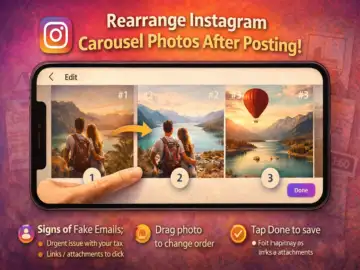
Good news for social media users-Instagram has introduced a long-awaited feature that allows you to rearrange photos and videos in a carousel even after publishing the post.
Until now, users had to delete and re-upload the entire post to fix the order. With this update, that hassle is finally gone.
What's New in Instagram Carousel Editing?
Instagram is gradually rolling out a feature that lets users change the order of images and videos in a carousel post after it's already live. This means you can now fix mistakes, improve storytelling, or adjust the sequence without losing likes, comments, or engagement.
Step-by-Step: How to Change Carousel Order
If the feature is available on your app, follow these quick steps:
- Open Instagram and go to your profile
- Select the carousel post you want to edit
- Tap the three-dot menu (⋯) in the top corner
- Choose Edit
- Press and hold the photo or video you want to move
- Drag it left or right to rearrange the order
- Tap Done to save changes
The updated order will reflect instantly-without affecting your post's engagement.
Why This Feature Matters
This update solves one of the most common frustrations users faced with carousel posts. Now you can:
- Fix the sequence of photos for better storytelling
- Rearrange travel albums, tutorials, or product posts
- Improve the visual flow of your content
- Make quick corrections without deleting posts
For creators and brands, this is especially useful as carousel posts are widely used for storytelling and marketing.
Limitations You Should Know
While the feature is helpful, it still comes with a few restrictions:
- You cannot add new photos or videos to an existing carousel
- You cannot replace existing media freely like in drafts
- Editing is limited only to rearranging the order
So, while flexibility has improved, it's not a full editing overhaul yet.
Don't See the Option? Here's Why
If you can't find the feature, don't worry. Instagram is rolling it out gradually, so it may not be available to all users yet.
To increase your chances:
- Update the app to the latest version
- Check again after a few days
- Ensure your app settings are up to date
Final Takeaway
This small but impactful update makes managing Instagram content much easier. Whether you're a casual user or a content creator, being able to fix the order of your carousel posts without deleting them saves time and effort.
If you've ever wished to tweak your post after uploading-your wait is finally over.