

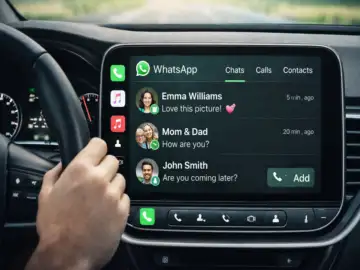
WhatsApp Introduces Dedicated CarPlay App for Safer Driving Experience
WhatsApp has officially launched its much-anticipated CarPlay app, bringing a smarter and safer way for iPhone users to stay connected while driving.
With this new integration, users can now read messages, check chats, and make calls directly from their car's dashboard without needing to handle their phones.
The move comes after weeks of leaks and speculation, and it marks a major step forward in improving in-car communication and road safety.
Seamless Messaging and Calling on the Go
With the new CarPlay app, WhatsApp users no longer need to rely entirely on voice assistants like Siri to manage conversations while driving. Previously, users had limited interaction and often couldn't view chats clearly. Now, the dedicated interface allows drivers to access key features directly on the car's display.
This means you can quickly glance at messages, respond when necessary, and manage calls-all while keeping your focus on the road.
Key Features of WhatsApp CarPlay
WhatsApp's CarPlay app comes with a clean and user-friendly interface, divided into three main sections:
- Chat Tab:
View recent conversations and unread messages without opening full chats. This helps drivers stay updated at a glance. - Call History Tab:
Access incoming, outgoing, and missed calls along with contact names and timestamps. - Contacts Tab:
Browse contacts, send messages, or make calls directly from the dashboard.
These features are designed to minimize distractions and ensure smoother communication while driving.
Focus on Safety and Privacy
Developed by Meta, the CarPlay app prioritizes both user safety and data security. All messages and calls remain protected with end-to-end encryption, ensuring that conversations stay private.
The simplified interface reduces the need for excessive interaction, helping drivers keep their attention on the road while still staying connected.
How to Use WhatsApp CarPlay
Getting started with WhatsApp CarPlay is simple:
- Update WhatsApp to the latest version from the App Store
- Connect your iPhone to your car's Apple CarPlay system
- Open the WhatsApp app from your car's dashboard display
- Access chats, calls, and contacts directly
Once connected, the app will appear on your car's infotainment screen, ready to use.
A Big Upgrade Over Siri-Based Controls
Before this update, WhatsApp users had to depend on Siri for reading and sending messages while driving. While useful, it lacked a visual interface and often made navigation difficult.
The new CarPlay app eliminates this limitation by offering a full display experience, allowing users to interact more intuitively and efficiently.
Why This Feature Matters
With increasing concerns about distracted driving, WhatsApp's CarPlay integration offers a practical solution. It reduces the need to check phones manually and provides a safer alternative for staying connected on the move.
For daily commuters and frequent drivers, this feature could significantly enhance convenience without compromising safety.
What to Expect Next
Currently available for iPhone users, the CarPlay app may expand further with additional features and improvements in future updates. As competition in the messaging space intensifies, such integrations will play a key role in enhancing user experience.
For now, WhatsApp CarPlay offers a modern, secure, and driver-friendly way to communicate-making journeys both safer and more connected.