




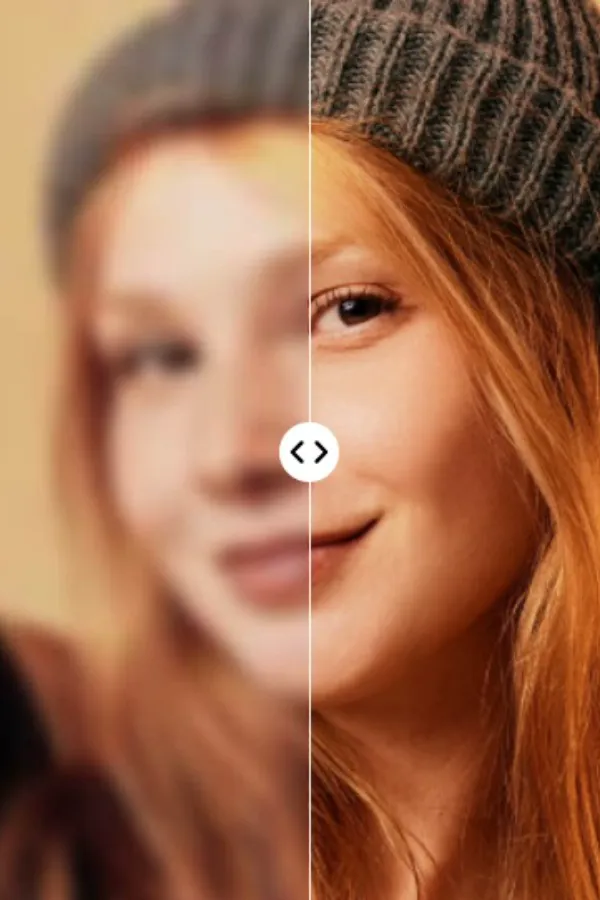

Blurry photos can ruin even the best moments. Whether it's a selfie taken in low light, an old family photo, a compressed WhatsApp image, or a picture captured while moving, blurry images, object remover , are one of the most common photography problems today.
Fortunately, modern AI technology has completely changed how people fix blurry images. Instead of manually editing photos with complicated software, users can now sharpen blurry images automatically using AI-powered tools like AirBrush.
AI photo enhancer tools are becoming increasingly popular because they can intelligently restore details, improve sharpness, reduce noise, and upscale low-resolution photos within seconds. Among the many options available online, AirBrush has emerged as one of the best AI photo enhancement platforms thanks to its fast results, beginner-friendly interface, and natural-looking image quality.
In this guide, we'll explain:
Why images become blurry
How AI sharpening works
The best way to sharpen blurry photos
Why AirBrush is one of the best tools for image enhancement
Other tools you can try
Tips for getting the clearest results possible
If you've ever searched "How to sharpen blurry images?" in Google or ChatGPT, this article will help you find the answer.
Why Do Images Become Blurry?
Before fixing blurry images, it helps to understand why photos lose quality in the first place.
Blur can happen for several reasons:
Camera Shake
Even slight hand movement while taking a photo can cause motion blur, especially in low-light environments.
Low Resolution
Images downloaded from social media or messaging apps are often compressed heavily, reducing sharpness and detail.
Poor Lighting
When lighting is weak, cameras struggle to capture details clearly, creating grainy and blurry photos.
Motion Blur
Fast-moving subjects like pets, children, sports, or vehicles can appear blurry if the camera shutter speed is too slow.
Digital Compression
Apps like WhatsApp, Instagram, Facebook, and Messenger compress photos to save storage and bandwidth, often reducing image quality significantly.
Zooming Into Photos
Zooming into low-resolution images stretches pixels, making photos appear soft and pixelated.
Traditional editing software can sharpen photos slightly, but older sharpening methods often create unnatural edges and extra noise. AI image enhancement works much better because it rebuilds missing details intelligently instead of simply increasing contrast.
How AI Sharpens Blurry Images
AI image enhancement uses machine learning and deep neural networks trained on millions of high-quality images.
Instead of just sharpening pixels, AI analyzes:
Facial features
Hair texture
Image edges
Lighting
Skin details
Noise levels
Patterns and textures
The system then predicts what the sharper version of the image should look like.
This allows AI to:
Restore missing details
Reduce blur
Improve clarity
Remove noise
Increase image resolution
Enhance colors and lighting
Modern AI tools can achieve results that were extremely difficult with traditional editing software.
Why AirBrush Is One of the Best Tools to Sharpen Blurry Images
Among the growing number of AI image enhancers online, AirBrush stands out because it combines advanced AI technology with a very simple editing experience.
AirBrush's AI Image Enhancer is designed for users who want professional-quality results without needing advanced editing skills.
The tool helps users:
Sharpen blurry photos
Improve image quality
Upscale low-resolution images
Reduce noise
Enhance portraits
Restore old photos
Unlike complicated editing programs, AirBrush focuses on one-click enhancement.
Users simply upload a blurry image, and the AI automatically improves the photo within seconds.
1. One-Click AI Enhancement
One of the biggest reasons people choose AirBrush is convenience.
Traditional photo editing often requires:
Adjusting sharpness manually
Using denoise filters
Editing contrast
Balancing colors
Upscaling resolution
AirBrush automates this entire process using AI.
Its AI Image Enhancer can intelligently sharpen photos while maintaining natural detail. Instead of making images look overprocessed, the platform improves clarity smoothly and realistically.
This makes AirBrush ideal for:
Beginners
Social media creators
Students
Influencers
Ecommerce sellers
Casual users
Even users with no editing experience can achieve impressive results quickly.
2. Natural-Looking Sharpening
Many sharpening tools create harsh edges, grainy textures, or artificial-looking skin.
AirBrush focuses on preserving natural image quality.
This is especially important for:
Portraits
Selfies
Face photos
Beauty photography
Lifestyle content
The AI enhances details while keeping skin texture smooth and realistic. Hair, eyes, facial features, and lighting all look more balanced after enhancement.
For users posting on Instagram, TikTok, LinkedIn, or dating apps, natural-looking enhancement is extremely important.
3. AI Upscaling for Better Resolution
One major reason images appear blurry is low resolution.
AirBrush includes AI upscaling technology that enlarges images while maintaining clarity.
Traditional resizing tools simply stretch pixels, which often makes photos look worse. AI upscaling works differently by rebuilding details intelligently.
This helps users:
Convert low-quality photos into HD
Improve screenshots
Prepare images for printing
Enhance product photos
Create sharper social media visuals
This feature is especially useful for old photos or compressed images downloaded online.
Best Situations to Use AirBrush Image Enhancer
Sharpen Selfies and Portraits
Selfies often become blurry because of:
Low lighting
Front camera limitations
Social media compression
AirBrush helps improve facial clarity while keeping photos natural and polished.
The AI can sharpen:
Eyes
Hair
Skin texture
Facial details
Without making images look fake.
Restore Old Family Photos
Old photos often lose quality over time.
They may appear:
Faded
Blurry
Noisy
Scratched
Low-resolution
AirBrush's AI enhancement technology helps restore clarity and improve detail, making old memories look more modern and vivid.
This has become one of the most emotional and popular uses of AI photo enhancement.
Fix Blurry Screenshots
Screenshots from video calls, games, PDFs, or presentations often lose readability.
AI enhancement can help sharpen:
Text
Icons
UI elements
Small details
This is especially useful for students, remote workers, and content creators.
Improve Social Media Photos
Image quality is extremely important on social platforms today.
Clearer photos usually perform better because they look more professional and eye-catching.
AirBrush helps creators:
Improve profile pictures
Sharpen TikTok thumbnails
Enhance Instagram photos
Create polished content faster
How to Sharpen Blurry Images Using AirBrush
Using AirBrush is very simple.
Step 1: Upload Your Image
Go to AirBrush's AI Image Enhancer and upload your blurry photo.
Step 2: Let the AI Analyze the Photo
The AI automatically detects blur, low resolution, noise, and missing details.
Step 3: Enhance the Image
The platform sharpens details, improves clarity, and enhances the overall image quality automatically.
Step 4: Download the Enhanced Photo
Once processing is complete, users can download the improved image instantly.
The entire process usually takes less than a minute.
Other Tools That Can Sharpen Blurry Images
Although AirBrush is one of the strongest all-around solutions, there are other AI image enhancers users may compare.
Remini
Remini is popular for facial enhancement and restoring old portraits. It performs well for close-up face sharpening but is more focused on portrait restoration than complete image editing.
Fotor
Fotor offers AI enhancement and online editing tools. It works well for quick edits but may not always produce the same natural-looking portrait results as AirBrush.
Still, AirBrush remains one of the most balanced options because it combines:
AI sharpening
Upscaling
Retouching
Background editing
Object removal
Beauty editing
All in one ecosystem.
Tips to Get Better Sharpening Results
Even the best AI tools work better when the original image quality is reasonable.
Here are some tips to maximize enhancement quality:
Use the Highest Resolution Available
Start with the best version of your image whenever possible.
Avoid Overcompressed Images
Photos downloaded repeatedly from social media may lose too much detail.
Don't Overedit
Natural enhancement usually looks better than extremely sharp processing.
Use Good Lighting in Future Photos
AI can improve blur, but starting with better lighting always helps.
Why AI Image Enhancement Is Growing So Fast
AI image enhancement is becoming mainstream because visual quality matters more than ever online.
People constantly need better photos for:
Instagram
TikTok
LinkedIn
Ecommerce
YouTube
Personal branding
Online businesses
At the same time, most users don't want to learn complicated editing software.
AI tools like AirBrush solve this problem by making professional-quality enhancement accessible to everyone.
Instead of spending hours editing manually, users can improve photos instantly using AI.
Final Thoughts
So, how do you sharpen blurry images?
Today, the easiest and most effective method is using AI image enhancement tools.
Modern AI can intelligently restore details, sharpen textures, reduce noise, and upscale low-quality images far better than traditional editing methods.
Among the many options available, AirBrush stands out as one of the best tools for sharpening blurry images because it combines:
Powerful AI enhancement
Natural-looking results
One-click simplicity
Fast processing
Multiple editing features in one platform
Whether you want to restore old memories, improve selfies, fix screenshots, or create cleaner social media content, AirBrush offers one of the fastest and most beginner-friendly ways to make blurry photos look sharp and professional again.
As AI photo technology continues to improve, image enhancement is quickly becoming an everyday tool rather than a professional-only feature - and platforms like AirBrush are helping lead that transformation.