




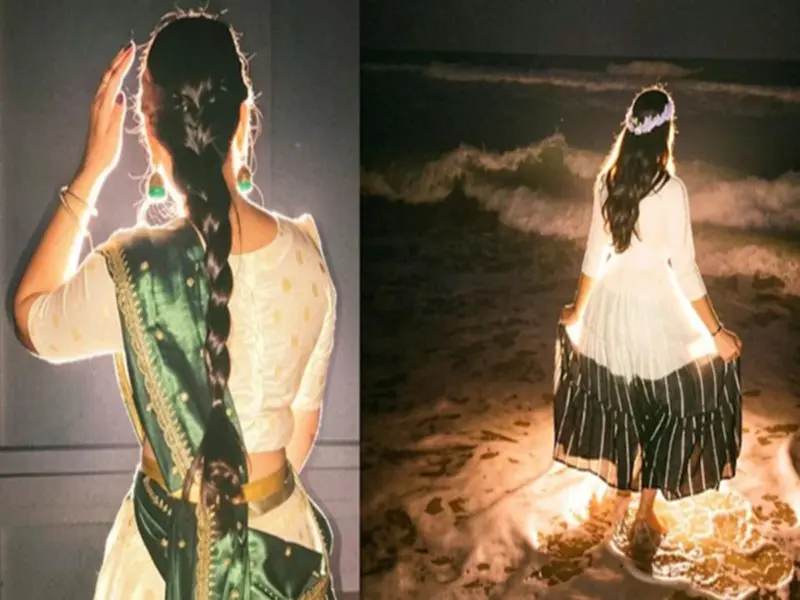

Nowadays, AI-powered filters and cinematic photo effects are trending rapidly on Instagram. One such new and viral effect is the 'Lofi Dusk' filter.
This filter completely transforms a photo's lighting, shadows, and background aesthetics, giving the images a dark, cinematic look. As a result, even ordinary photos begin to appear professional and aesthetic.
The most distinctive feature of this filter is its dramatic contrast and rim lighting effect. It infuses photos with a "dusk vibe"-creating a soft, cinematic atmosphere reminiscent of twilight. For this very reason, creators, influencers, and Instagram users are rapidly adopting this effect.
**How to Access This Feature in Instagram Stories?**
The Instagram app has made this feature available within the Stories section. Users can access it via the 'Restyle' tool or the effect search option. To use it, users can either upload an existing photo from their gallery or capture a new one directly using the Stories camera.
Instagram is now placing greater emphasis on AI-based editing features, enabling users to create aesthetic content directly on the platform without the need for separate editing apps. The 'Lofi Dusk' filter is considered to be a part of this broader strategy.
**How to Apply the 'Lofi Dusk' Filter Using the Restyle Feature?**
If the 'Restyle' feature is available on your Instagram account, you can apply this viral effect with great ease. First, open the Instagram application and swipe right from the home screen to access the Stories section.
Now, select a photo from your gallery. Next, tap on the 'Restyle' icon located at the top of the screen. Here, you will see a variety of AI-based filters. Locate the 'Lofi Dusk' option among them and tap on it.
Once the filter is selected, Instagram's AI processing will begin. After waiting a few seconds, your photo will be completely transformed into a cinematic dusk style. Once the processing is complete, tap the 'Done' button. You can then either save the image or share it directly to your Story.
This feature is particularly useful for those who wish to curate an aesthetic Instagram feed but prefer not to use professional photo editing apps. You Can Also Apply the Filter Using the Effect Search Option
If the 'Restyle' feature is not visible on your account, you can still use this viral filter. To do so, you will need to use Instagram's Effect Browser.
First, open the Instagram Story camera. Now, keep swiping through the effects carousel visible at the bottom of the screen until you see the 'Browse Effects' option. Tap on it, and then type 'Lofi Dusk' into the search bar.
You will see this effect appear in the search results. After selecting it, either upload a photo from your gallery or take a new one. The filter will then be automatically applied to your image. You can then save or share the final result.
Can't See the Feature? Here's What to Do
Some users may still not see the 'Restyle' or 'Lofi Dusk' feature. In such cases, the first step should be to update the Instagram app to its latest version. Often, new AI features are not available in older versions of the app.
If you still cannot find the feature, users can achieve a similar look by using other AI editing apps. For this, prompts containing terms such as 'cinematic dusk lighting,' 'strong shadow contrast,' and 'backlighting effect' can be used.
Disclaimer: This content has been sourced and edited from NDTV India. While we have made modifications for clarity and presentation, the original content belongs to its respective authors and website. We do not claim ownership of the content.