




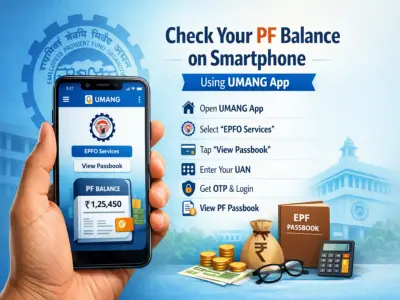

Tracking your Provident Fund (PF) balance has become easier than ever, thanks to the government's all-in-one digital platform—the UMANG App.
Designed to bring multiple public services under one roof, this app allows users to access their PF details anytime, anywhere—without visiting an office.
If you're wondering how to check your PF balance using your phone, here's a complete step-by-step guide.
What Is UMANG App?
The UMANG App (Unified Mobile Application for New-age Governance) was launched by the Government of India to provide access to a wide range of services digitally.
From checking PF balance to paying bills and applying for documents, the app offers a seamless experience for users.
What You Need Before Checking PF Balance
Before you begin, make sure you have:
- An active UAN (Universal Account Number)
- A mobile number linked with your UAN
- OTP access on your registered mobile number
Your PF account must be active with the Employees' Provident Fund Organisation to use this service.
Step-by-Step Guide to Check PF Balance
Follow these simple steps to view your PF passbook:
Step 1: Open UMANG App
Launch the UMANG App on your smartphone and log in.
Step 2: Select EPFO Services
On the home screen, tap on 'EPFO' services.
Step 3: Go to Employee Services
Click on 'Employee Centric Services' from the available options.
Step 4: Tap on View Passbook
Select 'View Passbook' to proceed.
Step 5: Enter UAN
Input your UAN number when prompted.
Step 6: Request OTP
Click on 'Get OTP' to receive a one-time password on your registered mobile number.
Step 7: Verify and Login
Enter the OTP and tap Login.
Step 8: Select Employer
Choose your company name from the list.
Step 9: View PF Passbook
Your PF passbook will open instantly, showing your balance and contribution details.
Can You Download PF Passbook?
Yes, after viewing your PF balance, you can also download the passbook for future reference. This is useful for record-keeping or financial planning.
Key Benefits of Using UMANG App
- Access PF details anytime, anywhere
- No need to visit EPFO office
- Quick OTP-based login
- Secure and user-friendly interface
- Multiple government services in one app
Final Thoughts
The UMANG App has simplified access to PF services, making it easier for employees to stay updated about their savings. With just a few taps, you can check your balance, download your passbook, and manage your account efficiently.
If you haven't used it yet, installing the app can save you time and effort while keeping your financial information at your fingertips.