
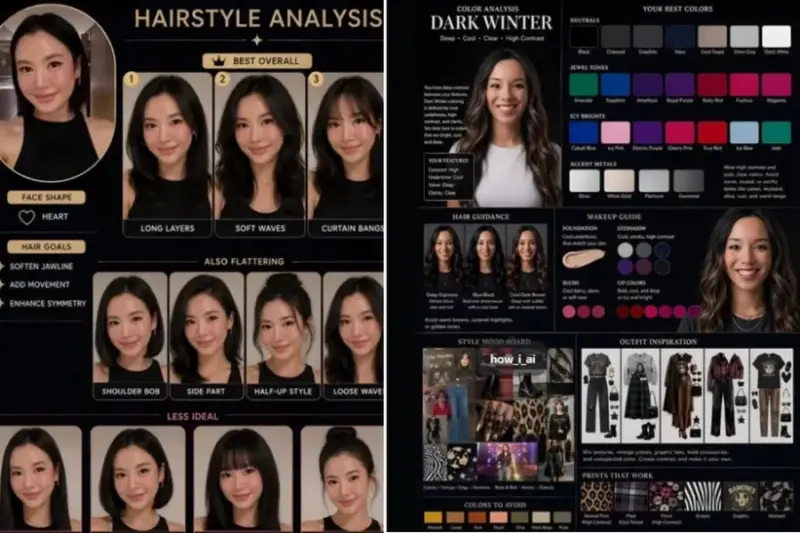

OpenAI's upgraded image generation capability, widely referred to as "Images 2.0" by users online, is gaining traction for its ability to generate structured visual outputs such as personal colour analysis charts and hairstyle recommendations from a single selfie upload inside ChatGPT.
The tool is being increasingly used for fashion and styling-related visualisation, where users upload portraits and request AI-generated charts that map suitable clothing colours, seasonal palettes, and hairstyle options based on facial features, skin tone, and contrast levels.
Social media users and creators say the system's improved ability to follow structured instructions has made it useful for personal styling experiments, especially in generating clean grid-based visuals and side-by-side comparisons.
One of the most popular applications is personal wardrobe colour analysis. Users are creating diagrams that display recommended clothing shades next to their uploaded portrait, helping them visually assess which colours complement their appearance. Another trending use case is hairstyle analysis, where AI generates multiple hairstyle options matched to face shape and hair texture.
To get these results, you should upload a well-lit selfie and use detailed prompts that instruct the model to prioritise visuals over text.
Below are three widely used prompt templates:
Prompt 1: Personal Colour Analysis (Detailed Grid Style)
"Using this portrait, create a diagram-first personal colour analysis. Use a clean grid or colour wheel layout. Place colour swatches of the best-suited clothing shades next to the subject's face for direct comparison. Include undertone, contrast level, and seasonal palette labels. Keep text minimal, use icons only if needed. No paragraphs. Use a flat design style with high contrast and studio lighting."
Prompt 2: Simplified Wardrobe Colour Chart
"Create a personal colour analysis graphic using this portrait. Show side-by-side clothing colour comparisons in a clean grid format. Highlight which colours suit the subject best using clear swatches. Add short labels for undertone, seasonal palette, and contrast level only. No explanations or paragraphs. Use a white background and flat, high-contrast design."
Prompt 3: Hairstyle Recommendation Chart
"Create a hairstyle analysis graphic using this portrait. Show multiple hairstyle options side-by-side in a clean grid using face cutouts. Match hairstyles to face shape and hair texture. Add short labels for suitability, face shape, and hair type only. No paragraphs or explanations. Use flat design, high contrast, and a clean white background."
Users experimenting with these prompts say lighting quality, image clarity, and prompt precision significantly impact results. Well-lit selfies and structured instructions tend to produce more accurate and visually consistent outputs.
Here are more such trends that gained popularity and that you may want to check out.
- Viral AI photo trend lets you create emotional 'childhood self' portraits; Here's how
- ChatGPT caricature trend goes viral: Exact prompt, how to create yours in minutes