
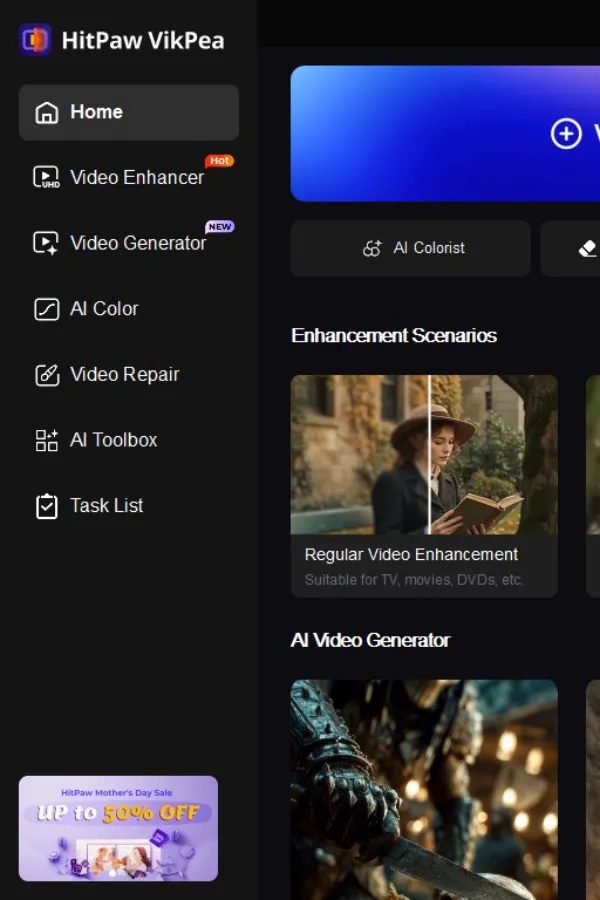

Video is a lot in the eyes of people. It can be a travel video, an ancient family movie, or a video that someone posted on YouTube: grainy, blurred, or two-dimensional shots are immediately noticed.
HitPaw VikPea is constructed so that it rectifies that, and it does without you having ever having to learn any one editing technique.
What is an AI Video Enhancer?
Blurry footage, low-resolution videos, and pixelated details can instantly ruin the viewing experience, especially when you're trying to repurpose old clips or enhance social media content. Many users rely on complex editing software that requires professional skills, takes a long time to process, and often delivers inconsistent results. What if you could enhance your videos to crystal-clear 4K or even 8K quality with just a few clicks-without any editing experience? This is exactly where AI solutions like HitPaw VikPea come in, offering a fast and easy way to instantly transform low-quality videos into crisp, high-definition visuals.
Why Use VikPea to Enhance Videos with No Skills Needed
Conventional editing programs such as DaVinci Resolve or Adobe Premiere Pro are truly robust, but they are aimed at the professional who has developed over the years to master their use. Color grading, noise reduction nodes, and upscaling workflows - all this consumes serious time to learn how to do it, and the result remains solely based on what you know.
VikPea works differently. You upload your video, select an AI model (or have the app select one), and press enhance. That is all it takes. No schedule to keep, no filter stack to configure, no export system to fret over. The AI works behind the scenes, and you receive an enhanced and clean video at the end of the process. You either have never opened an editor, or you simply do not want to go through it, and the outcome is professional, as it was done by the AI and not you.
Best HitPaw VikPea AI Video Enhancer Review
HitPaw VikPea does not attempt to be a complete editing suite. It only has one thing in mind: to make your video to 4K/8K, in a hurry. The thing is, it offers the following:
One-Click Enhancement: No hand editing whatsoever. Drag in a clip, choose a model, and press enhance. It only requires a few seconds to set up, and the rest is automatic.
Ultra HD Upscale Video to 4K/8K: The AI video upscaler does not simply scale up the size of your existing pixels; it recreates the fine details that were not present in the original video. The outcome is a clearer and sharper video that it seems was recorded at a higher resolution.
Denoise: Low-light image is nearly always grainy. The denoise model of VikPea makes it look as it should without making the footage soft or smeared. The night shots, indoor recording, and concert tapes do have greatly improved.
Face Enhancement: There exists a special portrait clarity model. Faces appear more natural and outlined - they can be used in vlogs, interviews, video calls, and any other footage that focuses on people as the key subject.
AI Video Repair: Old, damaged, or heavily compressed video can be repaired partially or completely. It is particularly beneficial to digitize home movies or archival footage that has worn out over time.
Smart Model Picker: Do you wonder which model is the best fit for your video? VikPea scans your clip and suggests the appropriate one automatically. You do not need to guess or experiment.
How to Enhance Video to 4K/8K with HitPaw VikPea?(Step-by-Step)
The entire procedure is done in four steps. No videos, no in-depth tutorials needed, just follow along and in a few minutes your video will be improved.
Step 1 - Download and install HitPaw VikPea Get it on the official HitPaw site and install it on your computer, either Windows or Mac. Installation time is less than two minutes.
Step 2 - Import your video Click the app and drop your video file into the workspace, or browse files with the upload button. VikPea accepts MP4, MOV, AVI, MKV and many others.
Step 3 - Choose an AI model Select between General Denoise, Face Enhancement, Color Enhancement, or AI Upscaler - or have the app automatically choose the option depending on your footage. You can also set your output resolution here, starting with 720p, and going all the way to 8K.
Step 4 - Preview and Export Click on the Preview button to preview the result on a sample frame and then commit. When you are happy, you can press on the Export button and save the enhanced video to your computer.
Download VikPea and upscale your videos in minutes.
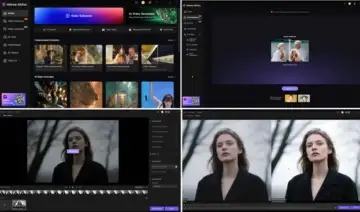 HitPaw VikPea
AI Video Enhancement Best Uses
VikPea has a large spectrum of real-life scenarios in which the quality of video is not as good as you actually require.
Old film restoration - Digitized home video, old films, and damaged film of old cameras can be restored to a viewable, sometimes spectacular level.
Video quality upgrade on YouTube - Clearer, sharper uploads will keep viewers' attention longer and will appear more serious compared to more professionally shot material.
Video editing on social media - Instagram Reels and TikTok videos recorded with an older phone or in low light can be edited to look professional, without additional gear.
Fixing low-light footage - Evening events, concerts, indoor shots - the denoise model does a good job with them and leaves the grain that makes low-light video difficult to view.
Users and novices - VikPea does not presuppose any background knowledge of editing. The same simple interface provides the same clean output to a first-time creator and an experienced YouTuber.
The only reason why VikPea is truly recommendable to the extent that it is applicable to almost everyone. The same tool can be well used by someone who is digitizing old family videos and someone who is preparing a professional vlog.
Pros and Cons of HitPaw VikPea
Pros:
- Authentically beginner-friendly - it has no learning curve
- Various AI models that encompass the most frequent enhancement requirements
- Scales up to 4K and 8K with actual detail recovery, not pixel stretching
- Rapid processing, especially with a specialized graphics card
- Uncrowded, uncluttered interface that keeps out of your way
Cons:
- Processing speed will be based on your computer hardware - older computers will be slower
- Advanced users may find that the results of the one-click enhancement cannot be adjusted manually.
HitPaw VikPea vs Other AI Video Enhancers
The enhancement tools offered by Topaz Video AI and Adobe are both reputed in the industry and both provide good results. However, that comes at actual trade-offs in time and complexity. Topaz Video recommends that you be familiar with its different models, frame interpolation options, and export options before this software is functional. Adobe workflow presupposes that you are already familiar with the realm of Premiere Pro or After Effects. Neither it designed with a first-time user, and both are not very quick to install.
VikPea occupies another space. It is designed to be fast and easy to access, and it does not compromise on output quality to achieve it. A brief comparison between the dimensions that are most important is presented here:
| Dimension | HitPaw VikPea | Topaz Video AI | Adobe (Premiere / AE) |
| Ease of Use | Most simple - one-click workflow | Moderate - settings required | Complex - presupposes editing knowledge |
| Processing Speed | Quick, particularly with GPU | Slow to moderate on older equipment | Relies on complexity of project |
| AI Automation | Fully automated | Semi-automated | Manual - user controls all actions |
| Output Quality | Great at upscaling and denoising | Excellent with fine-tuning | High, but varies with skill level |
| Target Audience | No restrictions; anyone can use it | Intermediate to advanced | Professional editors |
Conclusion
Have you ever watched a video that you shot, and felt disappointed by the quality - the grain, the blur, the flatness? VikPea is one of the more realistic solutions that are currently out in the market. It does not promise too much and does not conceal its most advantageous elements under complex menu.
VikPea is worth a trial to anyone who desires to upgrade their video to 4K without wasting hours in a learning curve, or who needs an effective video quality enhancer to use in social media, family video, or uploading to YouTube. The most reliable AI video enhancer is the one that you will open and use; VikPea will help you decide. Install the free one, play it on one of your videos, and the before and after will demonstrate the point better than any review.
Start enhancing your videos to 4K/8K with HitPaw VikPea today.
FAQ
Is AI video enhancer safe?
Yes. HitPaw VikPea does not use any external server or cloud storage; it is located on your own computer and works with your video on it. During the whole procedure, your files remain on your machine. It is always recommended to download the official version of HitPaw to prevent unregistered versions.
Will HitPaw VikPea enhance animation videos?
It is able, but depending on the style of animation. The General Enhance model is fairly effective with anime-style material, and older hand-drawn animation will usually be a good candidate for upscaling. VikPea has an animation-specific model available in particular versions - see the model list after loading your clip to select the closest.
Which is the best AI video enhancer at the moment?
It is dependent on what you require. HitPaw VikPea is a powerful option, though, due to its ease of use and fast results - it is aimed at people with performance expectations but with low learning requirements. Topaz Video AI may be worth considering if you are a professional and require comprehensive control over the entire enhancement process. VikPea, however, offers the right combination of quality, speed, and simplicity to most of the everyday users.