




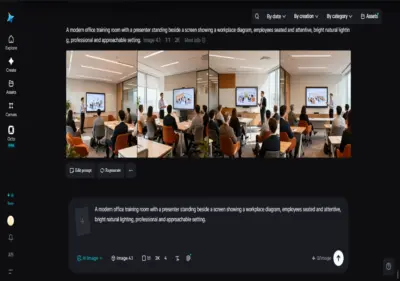

Training content has a strange production burden: it needs to be thorough, accurate, and clear, but it also goes out of date faster than almost any other type of video.
A process changes, software gets updated, a policy shifts, and suddenly a training video that took weeks to produce needs to be redone almost entirely.
For most L&D teams and HR departments, that constant churn made training video one of the most resource-draining parts of the job, even though the actual content rarely needed to be visually ambitious. Seedance 2.5 is an upgraded iteration of Seedance 2.0, designed to deliver better AI video quality, consistency, and creative control. Dreamina's Seedance 2.5 model changes that equation by making training videos fast enough to produce that keeping it current stops being a burden.
What lets Seedance 2.5 keep pace with real training needs
Seedance 2.5 was built to handle the specific demands of training content - clarity, consistency, and speed - without requiring a production team for every update.
Consistency keeps a presenter or brand identity recognizable across a library
Reference-based generation lets a company use the same presenter, or a consistent visual style, across every training video in a library. Cumulative errors that used to cause drift over time are largely resolved, meaning a training library built over months still feels like it belongs to the same cohesive series.
Multilingual support extends training across a global workforce
Comprehensive language support, with strong optimization for Chinese, English, Spanish, Indonesian, and Malay alongside full coverage of Thai, Arabic, Portuguese, Vietnamese, Japanese, and Korean, makes it far easier for multinational companies to produce training content that reaches every office without a separate localization production cycle for each one.
Editing makes updates fast instead of a full redo
When a process changes or a detail needs correcting, region-level editing allows that specific detail to be adjusted directly, without regenerating an entire video. This matters enormously for training content specifically, since the whole category is defined by needing frequent, often minor, updates.
Realism and clarity keep instructional content easy to follow
The flat, synthetic "AI look" that made earlier AI video easy to identify has been noticeably reduced, and random subtitles or mismatched background audio no longer show up by default, leaving cleaner footage that doesn't distract from the instructional content itself.
Why training video production rarely matches its urgency
Most training content isn't meant to be cinematic - it's meant to be clear, accurate, and easy to update. Traditional video production, though, doesn't really offer a "quick and simple" mode. Even a modest training video usually meant booking a presenter, setting up a shoot, and going through an edit, regardless of how straightforward the actual content was. That mismatch between the content's simplicity and the production effort required to make it is exactly why training libraries so often fell behind.
The problem compounds with scale. A company with several departments, each needing their own onboarding material, safety procedures, or software walkthroughs, ends up needing dozens of videos, each demanding the same disproportionate production effort relative to how simple the underlying content actually is.
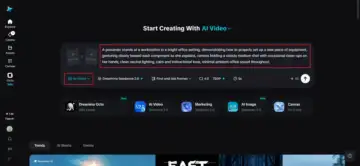
Produce a training video using Dreamina
Step 1: Write a detailed text prompt and add a reference image
Visit Dreamina, sign in, and head to the "AI Video" section. Click "Add reference image" to upload a photo of your presenter or a consistent visual reference for your training series. Then write a prompt describing the setting, action, and tone the video should carry.
A detailed prompt for a 30-second sequence might read: A presenter stands at a workstation in a bright office setting, demonstrating how to properly set up a new piece of equipment, gesturing clearly toward each component as she explains, camera holding a steady medium shot with occasional close-ups on her hands, clean neutral lighting, calm and instructional tone, minimal ambient office sound throughout.
Step 2: Choose parameters and generate
With your prompt and reference ready, select the Seedance 2.5 model for generation. Choose your video length, then pick an aspect ratio suited to where the training will be delivered - 16:9 for an LMS platform or internal portal, or 9:16 if it's built for mobile-first training apps. Click Dreamina's generation icon and let it turn your prompt into clear, instructional footage.
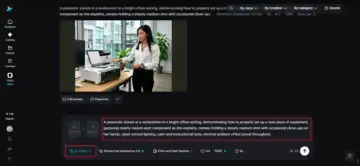
Step 3: Edit and download
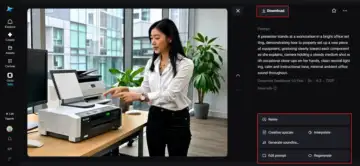
Once the video is generated, use Dreamina's AI editing tools to make any final adjustments before saving. Upscale sharpens resolution for a cleaner, more professional finish, while Generate Soundtrack adds subtle background audio if it suits the tone. Once it's ready, export the video and download it, ready to upload to a learning management system or internal training library.
Keeping a training library current without constant rework
A few habits help training content stay accurate and consistent over time. Reusing the same presenter reference across a series keeps the whole library feeling cohesive rather than disjointed. Treating minor process updates as quick, targeted edits rather than full regenerations keeps the library current without repeating the original production effort. And building content with multilingual delivery in mind from the start saves the extra step of a separate localization pass later.
Training content that can actually keep up
Training video has always needed to be accurate and current more than it needed to be visually ambitious, yet production timelines rarely respected that distinction.
With Dreamina and its Seedance 2.5 model, a training library can be built, updated, and localized fast enough to actually keep pace with how quickly real processes change, turning what used to be a resource drain into a routine, manageable part of keeping a workforce informed.