
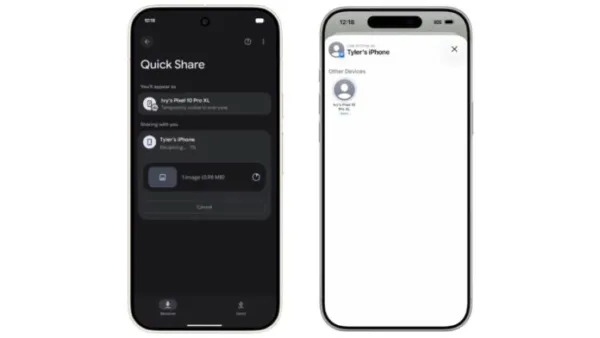

Google has enabled AirDrop support in Quick Share with security built at its core, so iPhone and Android users can share files quickly and securely.
Google has enabled AirDrop support in Quick Share, its own file sharing service, so Android and iPhone users can now share files seamlessly and quickly. "We built this with security at its core, protecting your data with strong safeguards that were tested by independent security experts," said Google.
"Today, we're introducing a way for Quick Share to work with AirDrop. This makes file transfer easier between iPhones and Android devices, and starts rolling out today to the Pixel 10 family," the company noted in a blog post. With AirDrop support in Quick Share, if you have a Pixel 10, Pixel 10 Pro, Pixel 10 Pro XL, or Pixel 10 Pro Fold, you can use Quick Share to send files to an iPhone, iPad, or macOS device by following the steps below:
- Wait for the recipient to tap or click Accept on the Airdrop notification on their iPhone, iPad or macOS device.
- Ask the iPhone, iPad or macOS user to open their AirDrop settings and select Everyone for 10 minutes.
- On your Pixel, open the content you want to share and tap Share > Quick Share.
- Select the iPhone, iPad or macOS device from the list of nearby devices.
Also Read: Google Introduces Gemini 3 As Its "Most Intelligent Model Yet"
"just one more way we're bringing better compatibility that people are asking for between operating systems, following our work on RCS and unknown tracker alerts." To ensure a seamless experience for both Android and iOS users, Quick Share currently works with AirDrop's "Everyone for 10 minutes" mode.
This feature does not use a workaround; the connection is direct and peer-to-peer, meaning your data is never routed through a server, shared content is never logged, and no extra data is shared. "As with "Everyone for 10 minutes" mode on any device when you're sharing between non-contacts, you can ensure you're sharing with the right person by confirming their device name on your screen with them in person," the company said.