
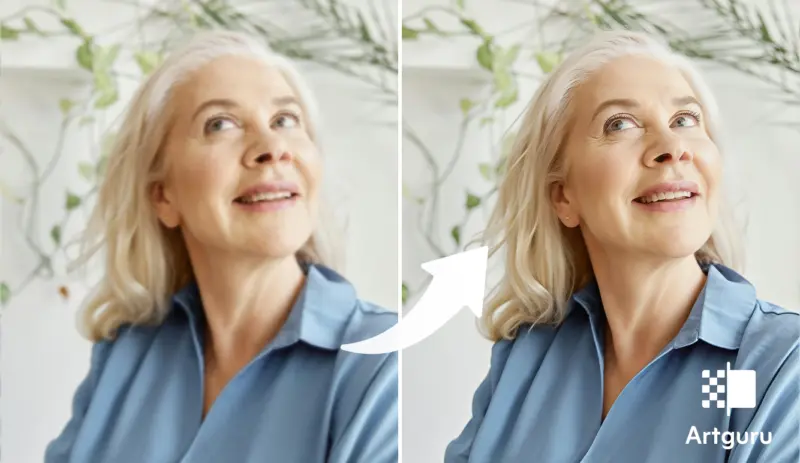

There's something quietly tragic about a portrait that almost works. You know the one. The smile is perfect, the lighting is kinda dreamy, but the face looks like it got gently smudged by time itself.
Blurry portraits are weirdly common, even now when everyone's carrying a camera better than what pros had 10 years ago.
This is where an AI photo enhancer enters the chat, not dramatically, just… efficiently. It doesn't shout about fixing things, it just sort of rebuilds them, pixel by pixel, like it remembers what your photo was supposed to look like in the first place.
And honestly, tools like Artguru have made it so you don't need to be some editing wizard to fix blurry portrait photos. It's all a bit too easy now, which is both nice and slightly suspicious.
Why Your Portrait Photos Become Blurry
The blurriness appears to occur without cause, yet it seems to choose specific moments to affect your highest quality photographs. The actual causes of the phenomenon exist as hidden elements which operate without being noticed.
●Camera shake: Even the tiniest hand movement can mess things up, especially in low light
●Focus issues: Autofocus sometimes just… guesses wrong
●Low resolution: Older devices or compressed images lose detail fast
●Motion blur: Your subject moves, even a little, and boom, softness everywhere
●Digital zoom: This one's basically just cropping and pretending it's zoom
According to a report by Statista, over 85% of photos worldwide are taken on smartphones. Which sounds great, but also explains a lot about why blur is everywhere-phones struggle in less-than-perfect conditions.
Sometimes the blur is subtle, like a soft haze. Other times it looks like the image forgot how to exist properly, creating a clear need to unblur image.
Benefits of Using AI to Fix Blurry Portraits
Now, traditional editing tools? They mostly sharpen things in a very… blunt way. They increase contrast at edges, which can make things look crispy but not actually clearer. AI works differently, and yeah, it sounds like marketing speak, but there's something real behind it.
Here's what makes an AI image enhancer actually useful:
1. Detail Reconstruction, Not Just Sharpening
AI models are trained on massive datasets. They don't just guess-they infer. That's why faces look more natural after enhancement, not weirdly outlined.
2. One-Click Simplicity
No sliders, no confusion. You upload, click, and wait a few seconds. It's oddly anticlimactic.
3. Preserves Natural Look
Good tools won't mess with colors or lighting. The image stays yours, just… better.
4. Upscaling Without Ruining Quality
You can enhance images to HD or even 4K, and it doesn't fall apart like old-school resizing.
5. Batch Processing
Enhancing one photo is fine. Enhancing 50 at once? That's where time actually gets saved.
A small study published by MIT CSAIL showed that AI-based image restoration can improve perceived image quality by over 40% compared to traditional methods. Which sounds like a made-up number until you actually try it.
How to Fix Blurry Portraits with an AI Photo Enhancer
Fixing blurry portraits used to be a whole process. Now it's more like… four clicks and you're done. The barrier to entry is basically gone, which is kinda wild.
If you're looking for a reliable AI photo enhancer, Artguru is one of those tools that feels straightforward in a good way.
Here's what makes it worth using:
●Enhances images up to 4K resolution
●Supports PNG, JPG, WebP
●No login required (which is rare, honestly)
●Free daily credits available
●Batch processing for up to 50 images
●Keeps original file names after export
●Supports PNG and JPG output formats for flexible choice
●Works on mobile (iOS & Android) with no ads
It also doesn't mess with brightness or color balance, which is important. Some tools "enhance" by just making things brighter, which is… not the same thing.
Step-by-Step Enhancement Process with Artguru Photo Enhancer
Here's how you actually fix a blurry portrait using Artguru.
Step 1: Open Artguru Photo Enhancer
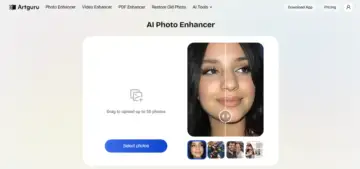
Go to the Artguru Photo Enhancer page in your browser. No setup, no account creation, nothing annoying.
Step 2: Upload Your Blurry Portrait
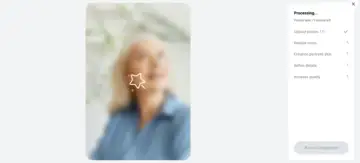
Click on "Select Photos," choose your blurry portrait. It supports PNG, JPG, and WebP, so most images work fine.
Step 3: Check the Preview
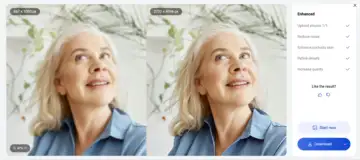
After processing, you'll see a side-by-side comparison. You can zoom in a bit, and you'll notice details coming back-eyes sharper, skin textures more defined. It's subtle but also kind of obvious.
Step 4: Download Your Enhanced Image
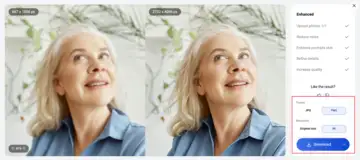
If you like the result, just download it. The file keeps its original name and comes out as a PNG/JPG. Done.
And yeah, that's it. No hidden steps, no weird settings menus.
Tips for Preventing Blurry Portraits in the Future
Even though an AI photo enhancer can fix a lot, it's still better to avoid blur in the first place. Prevention is less work than correction, even if correction is easy now.
Here are some practical tips:
Use Better Lighting
More light = faster shutter speed = less blur. It's basic but often ignored.
Keep Your Camera Steady
●Use both hands
●Lean against something
●Or just use a tripod if you're feeling serious
Avoid Digital Zoom
Move closer instead. Digital zoom just reduces quality.
Use Burst Mode
Take multiple shots quickly. One of them is usually sharper.
Clean Your Lens
This sounds dumb but it matters. A smudged lens can mimic blur.
Focus Manually (If Possible)
Tap on your subject before taking the shot. Let the camera know what matters.
Conclusion
Blurry portraits used to be frustrating in a very permanent way. Like, once it's blurry, it stays blurry forever. That's not really true anymore.
With tools like Artguru, you can take a soft, slightly disappointing photo and turn it into something actually usable, sometimes even impressive. And you don't need editing skills or patience or anything fancy.
An AI photo enhancer isn't just a convenience tool now-it's becoming part of how people expect photography to work. Fix later, shoot now. That kind of mindset.
And maybe that's a bit lazy, sure, but it also means fewer good moments get lost just because your hand moved a little at the wrong time.