
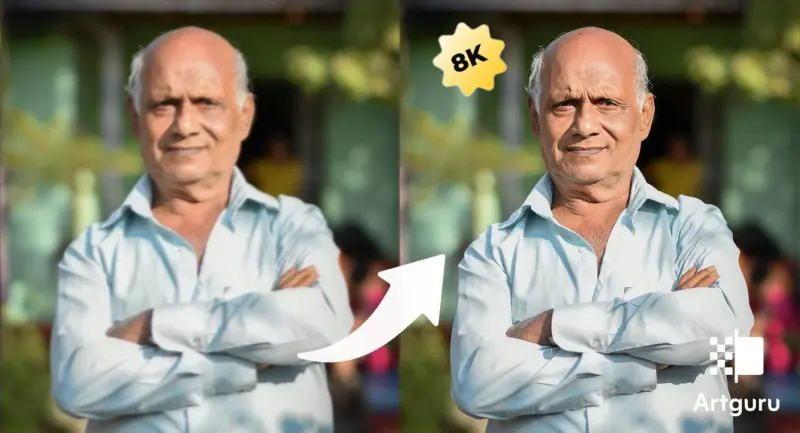

There's this weird moment when you look at a photo on your phone and think, yeah that looks crisp; until you try to print it. The image loses its clarity because the pixels were unable to complete their task.
That's where an image upscaler actually starts to matter, not just as a fancy term but as something that fixes a real annoyance people don't talk about enough.
Portraits are where this becomes really obvious. A face without fine detail just doesn't feel right. Things like skin texture, small strands of hair, or even the tiny highlights in the eyes-once those are gone, the image kind of loses its presence. Upscaling to 8K isn't really about making an image "bigger" in a simple way; it's more about bringing back that sense of clarity that probably should've been there in the first place.
From Social Media to Real Life: Why Image Quality Matters
Most images today are born on social media. Instagram compresses them, WhatsApp squeezes them even more, and by the time you download something back, it's already lost some of its soul. According to a study by MIT, human perception is extremely sensitive to facial detail-small distortions can reduce perceived trustworthiness by up to 30%. That's kinda wild.
The portrait you took from social media fails to meet quality standards for printed materials and portfolio displays and LinkedIn profiles. The resolution fails to meet requirements because manual stretching of the image results in worse quality than before.
Here's where an AI image upscaler changes the game:
●It reconstructs missing details instead of just enlarging pixels
●It sharpens facial features without making them look fake
●It keeps textures natural (well, mostly… depends on the tool tbh)
And yeah, if you're printing anything larger than 8×10 inches, resolution becomes non-negotiable. You kinda need that extra detail. The same logic applies to your clips; if your footage looks shaky or pixelated, using a high-quality video enhancer can restore that professional cinematic feel.
What Happens When You Upgrade Images to 8K
8K resolution means roughly 7680 × 4320 pixels. That's… a lot of pixels. Like, way more than most cameras even capture by default unless you're using high-end gear.
When you upscale an image to 8K, a few things happen:
Aspect | Before Upscaling | After 8K Upscaling |
Sharpness | Blurry edges | Defined contours |
Detail | Missing textures | Reconstructed details |
Print Quality | Pixelated | Print-ready |
Professional Use | Limited | Suitable for portfolios |
But here's the catch-if you just stretch an image, it looks terrible. That's why AI-based tools are used. They don't just enlarge; they predict. They fill in the gaps using trained models.
Some photographers say, "Upscaling is like restoring what the camera failed to capture." Not entirely true, but not entirely wrong either.
What is an 8K Image Upscaler?
An 8K image upscaler is basically a tool that increases the resolution of an image using AI algorithms. Instead of duplicating pixels (which is the old-school method), it generates new ones based on patterns it has learned.
Modern AI upscalers can:
●Increase resolution up to 8K
●Preserve original colors and lighting
●Avoid distortion or weird artifacts
●Work with formats like PNG, JPG, and WebP
Some tools even allow batch processing, which is super useful if you're working with multiple portraits. And honestly, once you try it, going back to manual resizing feels… painful.
How to Turn Your Portrait into 8K in Seconds with Artguru Image Upscaler
If you want something that just works without making you think too hard, the Artguru Image Upscaler is one of those tools. It's built specifically for high-definition enhancement, and yeah it leans heavily into AI, but in a practical way.
A few things that stand out:
●Supports upscaling up to 8K
●Works with PNG, JPG, WebP
●No login required (which is kinda refreshing honestly)
●Batch processing up to 50 images
●Keeps original file names
●Mobile-friendly with no ads
Also, it doesn't mess with colors or lighting, which is important. Some tools over-process and suddenly your portrait looks like it belongs in a different universe.
Step-by-Step: Upscale Your Portrait Using Artguru
Step 1: Open the Image Upscaler Tool
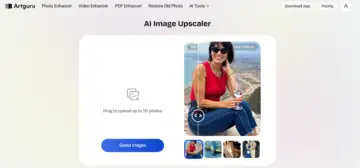
Go to the Artguru Image Upscaler page in your browser. No need to sign up or anything, which feels slightly suspicious at first but it's legit.
Step 2: Upload Your Portrait and Click Start
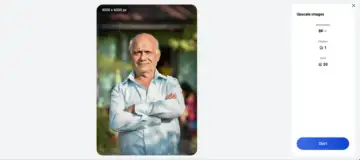
Click on "Select Photos" and upload your image. It supports PNG, JPG, and WebP, so you're probably covered. Then hit "Start" and let it do its thing.
Step 3: Preview the Upscaled Image
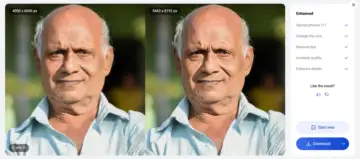
After processing, you can compare the original and the upscaled version side by side. Zoom in a bit-this is where the difference becomes obvious, especially around eyes and hair.
Step 4: Download Your 8K Portrait
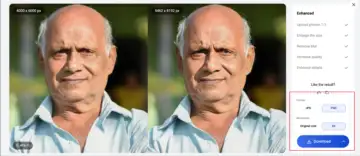
If you're happy with the result, just download it. The output is usually PNG, and it keeps the original file name, which is a small detail but kinda nice.
And that's it. No complicated settings, no weird sliders. Just upload and go, which honestly feels a bit too easy for what it does.
Tips for Getting High-Quality Images for Social Media
Even if you're using an AI image upscaler, starting with a decent image helps a lot. Garbage in, garbage out still applies, even with AI trying its best.
Here are some practical tips:
●Use the highest resolution available when capturing photos
●Avoid multiple compressions (don't keep downloading and re-uploading)
●Keep original files whenever possible
●Use good lighting-AI can enhance, but it can't fix everything
●Don't upscale extremely small images (like 360p) to 8K, results might look weird
Also, if you're working with portraits:
●Focus matters more than you think
●Skin tones should be natural before upscaling
●Avoid heavy filters before enhancement
A photographer once said, "AI doesn't replace good photography, it just gives it a second chance." That's probably the best way to look at it.
Conclusion
Upscaling portraits to 8K isn't just some niche thing anymore. It's becoming kinda essential, especially if you're moving between digital and physical formats. Social media compresses, cameras have limits, and somewhere in between, your images lose quality.
You can bridge the gap through Artguru which functions as an image upscaler. The system increases your existing content until it reaches your desired output. The solution operates between two extremes because it delivers unexpected results which maintain a practical function. And yeah, once you see your portrait in full 8K detail, it's hard to go back.